
What features does Mass Mailing News include?
Mass Mailing News combines everything a permission-based email campaign needs: personalized bulk sending through your own SMTP, an HTML message editor with templates and mail-merge, scheduling, real-time open and click tracking, deliverability tools, and contact-list management — all in one Windows desktop app under a one-time licence.
See Mass Mailing News in action
A quick look at the Windows app — compose and personalize your message, build your contact list, and manage everyone from one place. Click any screenshot to enlarge.

Compose & personalize
HTML editor with templates and mail-merge for every recipient.
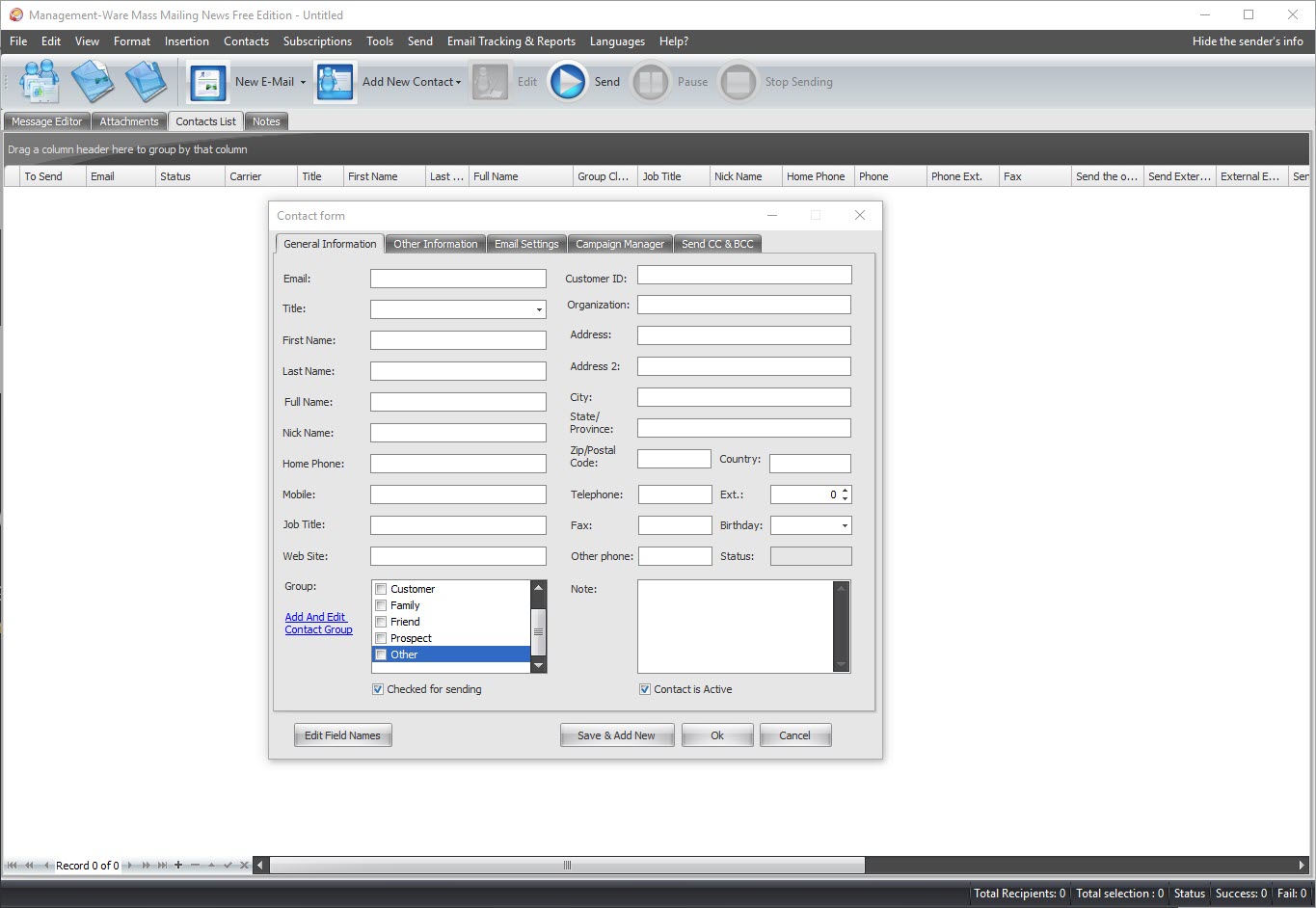
Build your list
Add contacts with rich fields and groups for segmentation.

Manage & segment
See and organize all your contacts in one place.
How does Mass Mailing News send your email?
It sends through your own SMTP rather than a shared cloud. Connect any SMTP over SSL/TLS — including Gmail — add several servers and rotate between them, control the send rate, and choose from up to three delivery modes. Your contact list never leaves your PC.
How do you design and personalize messages?
Compose in a built-in WYSIWYG HTML editor, start from a template, and personalize every email with mail-merge fields. You can also import HTML built in other editors, so existing newsletters drop straight in.
- Built-in WYSIWYG HTML editor with source-code view
- Ready-made HTML newsletter templates
- Mail-merge personalization for every recipient
- Import HTML created in other editors
Can you schedule and automate campaigns?
Yes. Schedule a campaign to go out once at a set time, or on a recurring hourly, daily, weekly, monthly or yearly basis. Set it up once and let it run — ideal for regular newsletters and follow-up sequences.
How does Mass Mailing News track results?
It records opens and clicks in real time and reports, per campaign, how many messages were sent, opened and clicked — so you can see what resonates and refine the next send. Tracking works with your normal sending, no extra setup.
How does it protect deliverability and keep you compliant?
SMTP rotation spreads sending across servers, throttling controls the send rate, and bounce handling manages addresses that fail. Opt-out addresses are removed from your lists automatically, which helps you honour unsubscribes under CAN-SPAM, CASL and the GDPR. Learn more about sending bulk email without spamming.
Full feature list
| Feature | What it does |
|---|---|
| Personalized bulk email | Mail-merge inserts each contact’s fields into every message. |
| HTML message editor | Built-in WYSIWYG editor with a source-code view. |
| Email templates | Start from ready-made HTML newsletter templates. |
| Import HTML | Load messages built in other HTML editors. |
| Your own SMTP | Send through any SMTP server over SSL/TLS, including Gmail. |
| Multiple SMTP servers | Spread sending across several servers. |
| SMTP rotation | Rotate between servers to protect deliverability. |
| Delivery modes | Choose from up to three delivery modes. |
| Email throttling | Control the sending rate. |
| Bounce handling | Manage addresses that fail to deliver. |
| Scheduling | Send once or on a recurring schedule. |
| Real-time tracking | See opens and clicks as they happen. |
| Campaign statistics | Sent, opened and clicked totals per campaign. |
| Unlimited mailing lists | Create as many lists as you need. |
| List import | Import contacts from Text, Excel and XML. |
| Automatic opt-out removal | Unsubscribed addresses are removed from your lists. |
| Windows desktop app | Runs on your PC; your list stays with you. |
Frequently Asked Questions
What features does Mass Mailing News include?
It sends personalized bulk email through your own SMTP, with an HTML editor and templates, mail-merge, scheduling, real-time open and click tracking, SMTP rotation, throttling, bounce handling, automatic opt-out removal, and list import from Text, Excel and XML.
Can I use my own SMTP server?
Yes. Connect any SMTP over SSL/TLS, including Gmail, use several SMTP servers with rotation, or choose from up to three delivery modes.
Does it personalize each email?
Yes. Mail-merge inserts each contact's own fields — such as name and company — so every message is individually addressed.
Can I schedule campaigns?
Yes. Schedule a campaign to send once, or on a recurring hourly, daily, weekly, monthly or yearly basis.
How does it track results?
It records opens and clicks in real time and reports how many messages were sent, opened and clicked for each campaign.
How does it help deliverability?
SMTP rotation spreads sending across servers, throttling controls the send rate, bounce handling manages failed addresses, and opt-out addresses are removed from your lists automatically.
Which contact list formats can I import?
You can build unlimited lists in the app and import contacts from Text, Excel and XML files.


